

Sundrop App Turns Endless Baby Photos Into Weekly Memories, Highlights and Time-Lapse Videos
A new iPhone app called Sundrop is helping parents transform their growing collections of baby photos into weekly recaps, highlight reels, time-lapse videos and creative digital keepsakes. Unlike many modern photo editing tools, Sundrop processes images directly on the device and does not rely on generative AI to create its visual content.
New parents often take hundreds or even thousands of pictures of their children, capturing everything from their first smiles to birthdays and everyday family moments. However, many of these photos eventually get buried in smartphone galleries and rarely receive a second look.
Sundrop aims to solve this problem by automatically finding meaningful family photos and turning them into organized collections and personalized memories.
The app was developed by Ben Springwater, Sky Lan and Rob Mackenzie, the same team behind the read-it-later application Matter. All three developers are parents themselves and created Sundrop to address a problem they experienced with their own growing photo libraries.
Rather than functioning as another general-purpose photo editor, the application focuses specifically on helping families rediscover and preserve memories of their children.
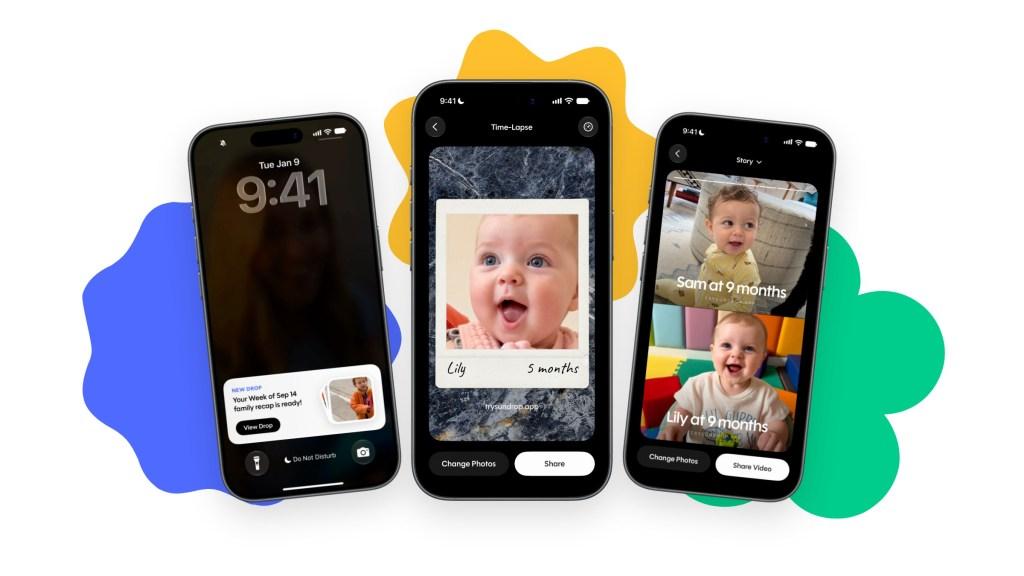
How Sundrop Turns Baby Photos Into Digital Memories
Sundrop scans the Camera Rolls on parents' iPhones to identify useful family photos while filtering out unnecessary content such as screenshots and duplicate images.
It then uses the selected pictures to create collections called "drops." These can include weekly summaries, highlight galleries, creative photo arrangements and videos documenting how a child grows over time.
One of the app's main features is its automatic weekly recap. Every Sunday, Sundrop prepares a collection of memorable photos and delivers a notification through the iPhone Lock Screen.
Parents can also create different types of visual memories using their existing pictures.
For example, the app can place siblings side by side at the same age, making it easier for families to compare how their children looked during similar stages of development.
Another feature creates time-lapse sequences showing a child's growth through photos taken over months or years. Sundrop can also turn selected pictures into short videos and highlight reels.
The application includes creative templates that allow parents to place their children's photos into designs resembling magazine covers and sports rookie cards.
These features are designed to make everyday family pictures more engaging without requiring parents to manually edit every image.
Sundrop Focuses on Privacy With On-Device Photo Processing
Privacy is one of Sundrop's biggest selling points, particularly because the application works with personal family photos and images of children.
According to its developers, the app processes photographs locally on the iPhone instead of uploading entire photo libraries to external servers.
To accomplish this, Sundrop uses Apple's Vision framework and on-device Core ML machine learning models to identify and organize images.
This approach allows the application to analyze photos and generate its collections without depending on hosted AI services.
The developers also emphasize that Sundrop does not use generative AI to create its scenes or highlights.
Instead, the app extracts a child from an existing photograph and places the original image into a layered design template. This means its creative scenes are assembled using real photographs rather than generating entirely new versions of a child's appearance.
For parents concerned about uploading personal family pictures to third-party platforms, local processing offers an additional privacy advantage.
However, users should remember that optional account linking and synchronization still involve Apple's iCloud services.
Parents Can Share Family Photos Through iCloud
Sundrop also includes a feature that allows both parents to use the application together.
After linking their accounts, parents can share selected family photos through Apple's iCloud synchronization system.
This makes it easier for both parents to contribute pictures taken on their individual iPhones and build shared collections of family memories.
The developers say this synchronization process does not require photographs to pass through servers operated by Sundrop.
Parents can also manually review and adjust the pictures used by the application. Alternatively, they can allow Sundrop to automatically organize selected images into galleries containing similar photographs.
This combination of automatic organization and manual control gives families more flexibility when deciding which memories they want to preserve.
Sundrop Subscription Price and Availability
Sundrop is available for iPhone users running iOS 26 or later. The application offers a seven-day free trial before requiring a paid subscription.
Its pricing includes the following options:
| Subscription | Price |
|---|---|
| Annual plan | $39.99 per year |
| Monthly plan | $7.99 per month |
| Free trial | 7 days |
The annual subscription also supports Apple's Family Sharing feature, meaning one parent can purchase the plan and share access with other eligible family members.
There is currently no Android version planned, according to the developers.
Parents interested in trying the application can find it on Apple's App Store.
How Sundrop Compares With Apple Photos and Google Photos
Apple Photos and Google Photos already provide tools for organizing pictures, recognizing people and creating automatic memories.
However, Sundrop takes a more specialized approach by focusing on families with young children.
Instead of organizing an entire photo library around general categories, it concentrates on children's growth, sibling comparisons and memorable family events.
Its weekly recaps and time-lapse features are designed specifically for parents who want to follow their children's development without manually sorting through thousands of photographs.
Privacy is another important distinction. Sundrop says its photo analysis takes place directly on the iPhone and does not involve uploading the user's photo library to its own servers.
The application also avoids generative AI when creating its visual scenes, relying instead on existing photographs and layered templates.
While Apple Photos and Google Photos remain broader photo-management platforms, Sundrop offers a more focused experience for parents looking to turn everyday family pictures into keepsakes.
Sundrop Gives Parents a New Way to Preserve Childhood Memories
Sundrop offers an interesting solution to a problem many new parents experience: having thousands of photographs but very little time to organize and revisit them.
Its automatic weekly recaps, sibling comparisons, growth time-lapses and creative templates make it easier to turn ordinary pictures into meaningful family memories.
The application's emphasis on on-device processing and avoiding generative AI also gives it a different position in an increasingly AI-driven photo editing market.
Although its subscription model and iPhone-only availability may limit its appeal, Sundrop could become a useful option for parents who want a simpler way to organize their children's photos and watch them grow over time.
اترك تعليقاً
لن يتم نشر عنوان بريدك الإلكتروني. الحقول المطلوبة مشار إليها بـ *