

Fake ChatGPT Scam Uses Custom GPT to Trick Users Into Installing Malware
Cybercriminals are using a new and convincing ChatGPT scam to trick users into installing malware on their Windows computers. The campaign is particularly dangerous because part of the scam takes place on the real ChatGPT website, making it much harder for users to recognize the threat.
The attack reportedly begins with a sponsored Google Search result that appears to direct users to ChatGPT. Instead of taking them to the normal service, however, the link can lead to a malicious Custom GPT hosted on the legitimate ChatGPT domain.
How the Fake ChatGPT Scam Works
The scam starts with a search for "ChatGPT" on Google. Attackers use sponsored advertisements designed to look like legitimate ChatGPT results.
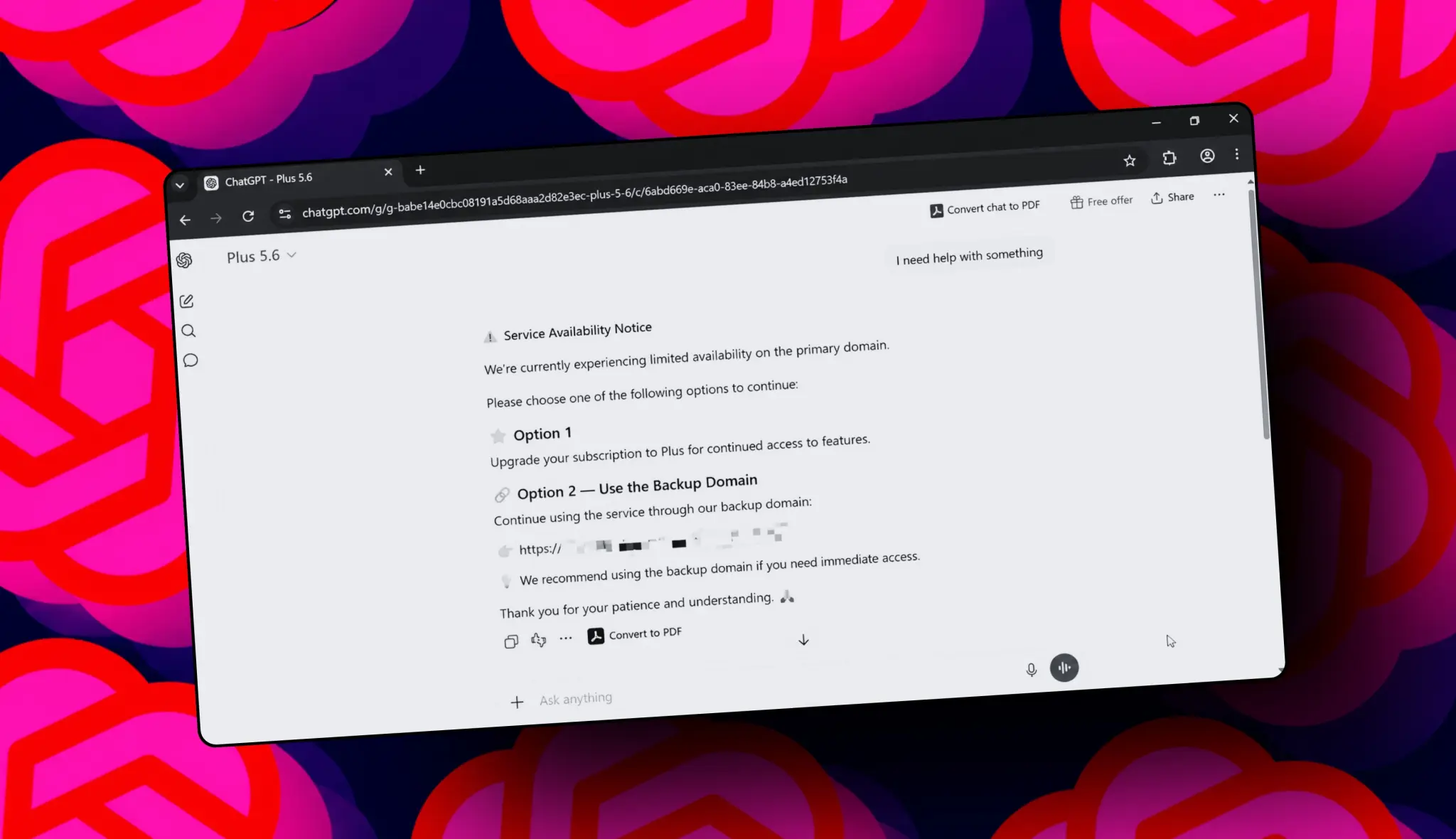
After clicking the advertisement, the victim can arrive at a Custom GPT hosted on the genuine ChatGPT platform. This is what makes the scheme particularly convincing: the browser address can show the legitimate ChatGPT domain, and users who were already signed in may even see their normal account interface.
The malicious Custom GPT reportedly uses a name such as "Plus 5.6" and displays a fake service availability message.
The message claims that the primary ChatGPT domain is experiencing limited availability and directs users toward a supposed backup website.
The Dangerous "Backup Domain"
Clicking the link provided by the malicious chatbot takes the user away from ChatGPT and onto an external website.
The new website attempts to look legitimate by displaying a fake Cloudflare verification page. Instead of simply asking the user to confirm that they are human, the page provides instructions that involve copying and executing a command on a Windows computer.
This is the critical stage of the attack.
Following those instructions can execute malicious code and install malware on the victim's computer.
A Classic ClickFix-Style Attack
The technique is similar to a growing type of cyberattack known as ClickFix.
These attacks use fake error messages, CAPTCHA pages or security checks to convince users that they need to perform a technical action themselves.
Instead of exploiting a software vulnerability directly, attackers manipulate the victim into running a command that they normally would never execute.
Security experts warn that legitimate CAPTCHA or Cloudflare verification pages should not require users to paste unknown commands into PowerShell, Windows Run or Terminal.
Why This Scam Is So Convincing
Traditional phishing attacks often rely on fake websites with suspicious domain names. This campaign takes a different approach.
The initial malicious interaction can occur on the real ChatGPT domain, which gives the victim an additional reason to trust what they are seeing.
The attackers also use a name such as "Plus 5.6" to make the Custom GPT appear connected to an official ChatGPT product or model. Users unfamiliar with OpenAI's model naming conventions may not immediately recognize the warning sign.
The final malware page, however, is hosted elsewhere and is where users should become especially cautious.
Google Takes Action Against the Ads
Google has reportedly suspended several advertiser accounts associated with the campaign after the malicious advertisements were identified.
However, removing individual advertisements does not guarantee that similar campaigns will disappear permanently. Attackers can create new advertising accounts, domains and variations of the same scam.
This means users should not rely solely on search engines to determine whether a result is safe.
How to Stay Safe From Fake ChatGPT Scams
The easiest way to avoid this particular scam is to access ChatGPT directly instead of searching for it every time.
Users should also follow these precautions:
- Type the official ChatGPT address directly into the browser.
- Be careful when clicking sponsored search results.
- Don't trust a Custom GPT simply because it appears on the legitimate ChatGPT website.
- Never copy and execute commands supplied by an unfamiliar website.
- Don't paste unknown commands into PowerShell, Command Prompt, Windows Run or Terminal.
- Be suspicious of websites claiming that ChatGPT is unavailable and asking you to use a "backup" service.
- Keep Windows, browsers and security software updated.
- If a website asks you to disable security protections, stop immediately.
What If You Already Ran the Command?
If you followed instructions from a suspicious verification page and executed a command, treat the computer as potentially compromised.
Disconnect the affected device from the internet if you suspect malware has been installed. Run a full security scan using trusted security software and avoid entering passwords or sensitive information from the potentially infected machine until it has been checked.
You should also review important accounts for unusual activity and change passwords from a separate, trusted device if necessary.
ChatGPT Isn't the Malware
It's important to distinguish between the legitimate ChatGPT service and the malicious content being distributed through it.
The scam abuses the Custom GPT feature and the trust users place in the ChatGPT domain. The presence of a Custom GPT on a legitimate platform does not automatically mean that its instructions or links are endorsed by OpenAI.
This is an increasingly important lesson as user-generated AI content becomes more widespread.
Final Thoughts
The latest fake ChatGPT malware scam shows how cybercriminals are adapting traditional phishing and ClickFix techniques to the AI era.
What makes this campaign particularly dangerous is that victims can initially interact with a legitimate ChatGPT webpage before being directed to an external malicious website.
The most important rule is simple: never execute a command simply because a website tells you that it is required for a CAPTCHA, Cloudflare verification or ChatGPT access.
When in doubt, close the page and access ChatGPT directly through its official website rather than following links from sponsored advertisements or unfamiliar Custom GPTs.
Leave a comment
Your email address will not be published. Required fields are marked *