


Opera WebAI Lets Websites Run AI Locally on Your Computer
Opera is taking a different approach to web-based artificial intelligence. Instead of requiring websites to send AI requests to remote servers, the browser company wants some AI processing to happen directly on the user's computer.
Opera has introduced WebAI, an early-preview technology that allows websites and browser extensions to access compatible AI models running locally through the browser. The goal is to reduce dependence on cloud AI services while giving users more control over their data and the models running on their devices.
The technology could eventually change how websites use AI, particularly for features that don't necessarily require a powerful cloud-based model.
What Is Opera WebAI?
WebAI is Opera's implementation of a proposed web standard that allows websites and extensions to interact with AI models running locally in the browser.
Instead of sending every request to an external AI service, a website could use the AI capabilities available on the user's own computer.
Opera says WebAI can be used for tasks such as:
- Generating text
- Classifying information
- Understanding relationships between pieces of content
- Analyzing webpages
- Creating AI-powered browser extensions
- Processing information locally
The proposed standard has backing from companies including Google and Microsoft, while Opera's implementation is designed to support different compatible AI models rather than being locked to a single provider.
AI Can Run Without Sending Data to the Cloud
One of the biggest advantages of local AI is that information processed by the model does not necessarily need to leave the user's device.
With traditional cloud AI services, a website or application may send information to a remote server for processing. WebAI is designed to let compatible AI tasks run directly on the computer instead.
This could be particularly useful for information that users would prefer to keep on their own devices.
However, local AI should not automatically be considered completely private. A website or extension can still collect or transmit information separately depending on how it is designed and what permissions the user grants.
Opera's WebAI implementation uses site-specific permissions, giving users control over which websites can access local AI.
No Separate AI Subscription Required
Another potential advantage is cost.
Developers normally have to maintain AI infrastructure or pay an AI provider whenever users send requests to a cloud model.
With local AI, the user's own computer performs the processing.
That means developers could potentially add AI-powered features without paying a cloud provider for every request. Users also don't necessarily need a separate AI subscription to use those features.
This could be particularly interesting for independent developers and smaller companies that want to experiment with AI without taking on large ongoing inference costs.
Google Gemma and Apple's AI Models Are Supported
Opera says its WebAI implementation is model-agnostic, meaning it isn't restricted to one AI provider.
At launch, compatible models include Google's Gemma family and, on Macs with Apple silicon, Apple's on-device foundation model.
Opera also says it plans to introduce additional models optimized for different types of devices.
This approach could eventually give users more choice over which AI model operates on their computer.
Websites Could Become Much More AI-Powered
The biggest change may come from what developers can build on top of WebAI.
For example, an extension could analyze a user's open tabs and organize them automatically. Another could identify potentially misleading headlines, while another could highlight job listings that match a user's interests.
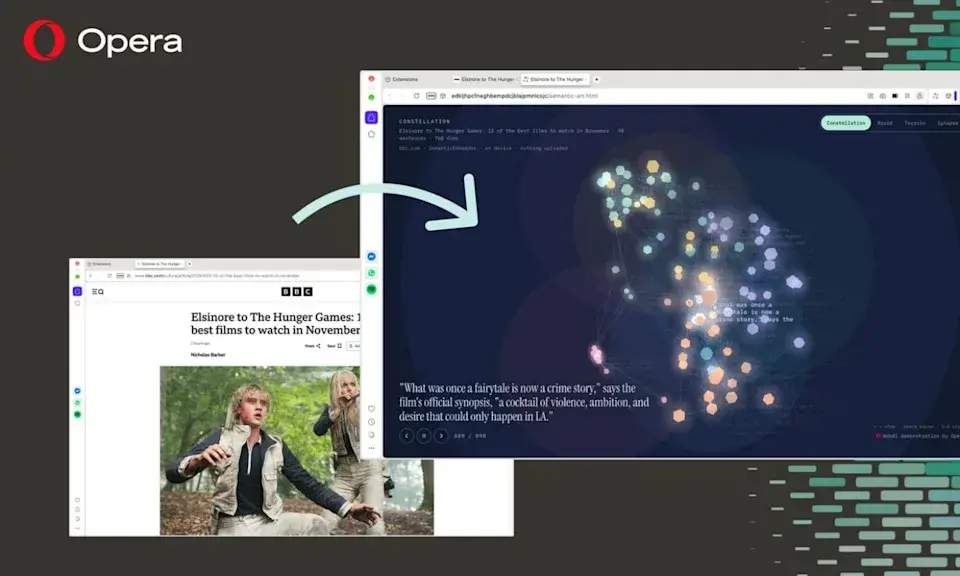
Opera has already created experimental extensions to demonstrate some of these possibilities.
One example, called Project Lens, analyzes articles and highlights sections according to their relevance to a user's chosen project. Other experiments can create quizzes from articles, analyze content or transform text into visual experiences.
These are demonstrations rather than standard Opera features, but they show how local AI could be integrated directly into everyday browsing.
WebAI Is Opt-In
Opera is not enabling WebAI silently.
The feature is opt-in, meaning users must choose to activate it before compatible AI models are downloaded.
After enabling WebAI, users can control access through website-specific permissions.
This is important because allowing websites to access local AI models could potentially introduce new security and privacy considerations. Opera says users remain in control of whether the feature is enabled.
Your Computer Does the Heavy Lifting
There is also a trade-off with local AI.
When AI processing happens in the cloud, the user's computer doesn't have to do most of the computational work. With WebAI, the local machine handles the AI processing.
That means performance depends heavily on the hardware.
Opera says WebAI is currently available as an early preview on 64-bit Windows PCs using Intel or AMD processors and Macs powered by Apple silicon. It does not currently support Intel-based Macs, Linux or Windows on Arm.
Users with less powerful hardware may therefore experience slower responses or have fewer suitable models available.
Opera Also Introduces HTML-in-Canvas
WebAI isn't the only new technology Opera announced.
The company is also introducing HTML-in-Canvas, which allows developers to place real, interactive webpages inside 2D and 3D environments.
Unlike a simple screenshot or video, the embedded webpage remains interactive. Buttons, menus, text and forms can continue working inside the virtual environment.
Opera has demonstrated the technology with projects including Webpage Bulldozer, where webpage elements become physical objects, and Gamer Room, which places live webpages onto screens inside a 3D environment.
The feature could be particularly interesting for games, virtual environments and experimental browser experiences.
What WebAI Could Mean for the Future of Websites
Opera's approach points toward a possible shift in how AI is delivered on the web.
Today, many AI-powered websites depend on cloud infrastructure. In the future, some simpler AI functions could potentially run directly on the user's computer.
That could provide several benefits:
- Lower cloud computing costs
- Less dependence on AI subscriptions
- Reduced need to send data to external AI providers
- Faster local processing for some tasks
- More control over AI models
- New types of browser extensions
But there are still challenges. Local models require suitable hardware, browser support needs to expand and developers must carefully manage privacy and security.
When Can You Try Opera WebAI?
Opera has begun rolling out WebAI as an early preview.
To try it, users can update Opera One and go to Settings → Opera AI, then enable the WebAI option. A compatible local model will then be downloaded to the computer.
Opera says the technology will continue to evolve, with more models and development tools planned.
Opera Wants AI to Become Part of the Web
Opera's WebAI experiment goes beyond adding another chatbot to a browser.
The company is trying to make local AI a platform that websites and extensions can use directly.
If the approach gains broader browser and developer support, websites could eventually perform more AI-powered tasks using the computer's own hardware rather than relying entirely on remote AI servers.
For users, that could mean greater privacy and potentially lower costs. For developers, it could create a new way to build AI-powered websites without paying for every cloud inference request.
For now, WebAI remains an early preview, but Opera's experiment could offer a glimpse at a future where AI becomes a built-in part of the web itself rather than something that always lives in the cloud.
Bir yorum bırakın
E-posta adresiniz yayınlanmayacaktır. Gerekli alanlar * ile işaretlenmiştir