

ChatGPT’s Locked Chats Feature Adds an Extra Layer of Privacy for Sensitive Conversations
ChatGPT is introducing a new privacy feature that allows users to protect selected conversations with an additional layer of security. Called Locked Chats, the feature lets users hide sensitive discussions from their regular chat history and require authentication before opening them.
The feature could be useful for people who use ChatGPT to discuss personal matters, work-related topics, private plans, or other information they do not want others to see when borrowing their device.
Unlike Temporary Chats, which are designed for conversations that do not appear in regular chat history, Locked Chats allow users to keep conversations saved while restricting access to them.
How ChatGPT Locked Chats Works
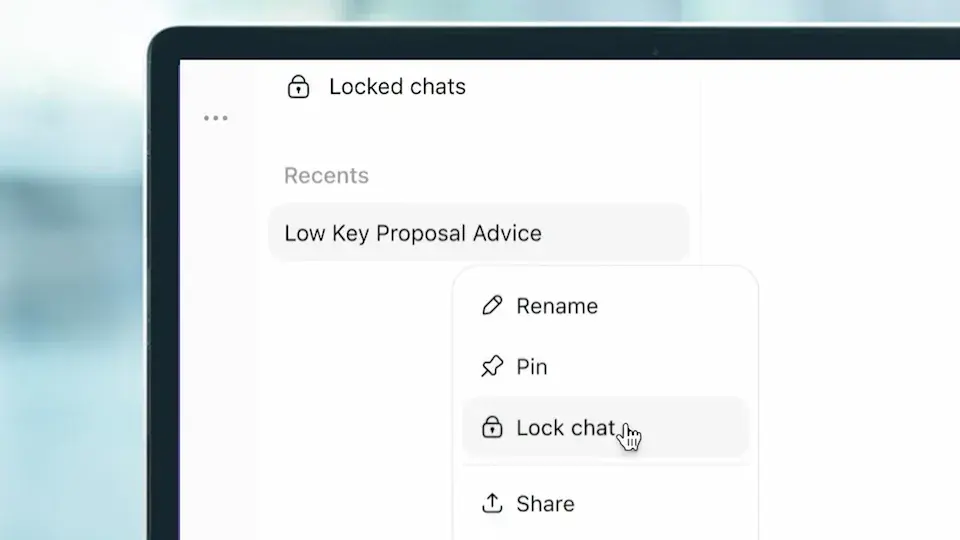
Once a conversation is locked, it moves to a dedicated Locked Chats section. Its title and content no longer appear in the regular conversation list, pinned chats, or standard chat search.
On the web and desktop, users can access locked conversations with a four-digit account PIN. On supported mobile devices, authentication options can also include Face ID, Touch ID, or the device's supported unlock method.
To lock an existing conversation, users can generally follow these steps:
- Open the ChatGPT conversation they want to protect.
- Select the three-dot menu beside the conversation.
- Choose Lock chat and confirm the action.
- Create a four-digit PIN if prompted.
- Use the PIN or supported device authentication when accessing Locked Chats.
Users can also start new conversations from the Locked Chats section. This makes it possible to discuss a sensitive topic without placing the conversation in the regular chat history.
The feature is particularly useful when someone needs to hand their phone to a friend, family member, or colleague without making private conversations immediately visible.
Locked Chats and ChatGPT Memory
One important aspect of Locked Chats is how it separates information from ordinary conversations.
When Memory is enabled, locked conversations can have their own separate memory. Information shared in locked chats can be remembered within that protected area without automatically being added to the regular Memory used across ordinary conversations.
However, locking a conversation does not erase information ChatGPT already remembered before the chat was locked. Users should understand this distinction if they want to keep certain information separate from their normal conversations.
This separation can help users manage private discussions while retaining the ability to return to them later. It is still important to review ChatGPT's Memory and personalization settings if privacy is a priority.
Locked Chats Are Different From Temporary Chats
Although both features can help users manage privacy, they serve different purposes.
Locked Chats are designed for conversations that users want to save and revisit while keeping them out of regular chat history and search results.
Temporary Chats, on the other hand, are intended for conversations that users do not want saved in their regular history. Temporary Chats do not create or update Memory, and they follow separate data-handling rules.
Choosing between the two depends on the situation. Someone planning a surprise or discussing a private topic they may need later could prefer Locked Chats. Someone who wants a one-off conversation without saving it to regular history may prefer Temporary Chat.
Neither feature should be treated as a guarantee that information is completely inaccessible to every other party.
Important Privacy Limitations to Understand
Locked Chats add an access-control layer, but they do not create an end-to-end encrypted conversation or a separate encrypted vault. Locking a chat also does not change OpenAI's applicable data-retention policies or automatically switch off model-improvement settings.
This means users should not assume that a locked conversation receives special protection from all forms of data processing simply because it is hidden from the regular chat interface.
There is another important detail concerning the PIN. According to OpenAI's guidance, resetting a forgotten account PIN permanently deletes the locked chats and information stored only within them, including protected files and memories. This action cannot be undone.
Users should therefore keep their PIN secure and distinguish between changing a known PIN and resetting one they have forgotten.
Some conversation types also cannot be locked, including Temporary Chats, archived chats, group conversations, and certain chats associated with shared links or scheduled tasks.
Who Can Use ChatGPT Locked Chats?
OpenAI has announced a gradual rollout of Locked Chats across ChatGPT's Free, Go, Plus, Pro, Business, Enterprise, and Edu plans. Availability may vary while the rollout continues, and the feature is not available in ChatGPT for Healthcare.
If the option does not appear in your account, check for an app update and allow time for the feature to become available.
Users should also remember that locking a chat does not replace securing their phone, computer, or ChatGPT account. Anyone with access to an already authenticated session may encounter other privacy risks, so device security remains important.
Is ChatGPT Locked Chats Worth Using?
For people who share devices or regularly use ChatGPT for personal conversations, Locked Chats offers a convenient way to keep selected discussions out of immediate view without deleting them.
Its biggest advantage is the ability to preserve conversations while adding a PIN or supported device authentication requirement. The separate memory behavior can also help distinguish information shared in locked discussions from the user's ordinary ChatGPT conversations.
However, it is best understood as a privacy convenience rather than comprehensive data protection. Users who handle sensitive information should continue reviewing their account settings and avoid sharing information they are not comfortable submitting to an online AI service.
Overall, Locked Chats gives ChatGPT users more control over which conversations appear in their regular history. Its usefulness will depend on individual privacy needs, device-sharing habits, and an understanding of the feature's limitations.
Leave a comment
Your email address will not be published. Required fields are marked *