

Roku users who enjoy watching colorful tropical fish swimming across their television screens are about to lose one of the platform's most popular screensavers. The company is discontinuing its Aquatic Life screensaver starting December 1, 2026, ending a feature that has entertained users for years.
The relaxing virtual aquarium transforms an idle television into an underwater scene filled with tropical fish, coral decorations, and moving water. It has become a favorite among users who prefer peaceful background visuals instead of traditional animated screensavers.
The upcoming removal has disappointed longtime fans, but several alternative screensavers are available through the Roku Channel Store.
Why Is Roku Removing the Aquatic Life Screensaver?
Aquatic Life is a licensed aquarium animation created by digital artist Jim Sachs through his SereneScreen project.
According to reports, Sachs decided not to renew the licensing agreement that allowed Roku to distribute the screensaver. His decision is connected to concerns about Fox Corporation's acquisition of Roku.
Sachs reportedly explained that he did not want his artwork associated with Fox's business and media environment.
The licensing decision has financial consequences for the creator, but he has chosen not to continue the arrangement.
Roku users have started receiving notifications explaining that Aquatic Life will no longer be available from December 1. Devices currently using it are expected to switch automatically to the Roku City screensaver.
What Made Aquatic Life So Popular?
Unlike ordinary screensavers, Aquatic Life creates the appearance of a real aquarium.
Its animated tropical fish swim through detailed underwater environments, while bubbles and coral decorations add movement to the display.
Some users also appreciate that it provides a peaceful visual experience without turning their television into an advertising display.
The screensaver has been particularly popular among people who enjoy aquarium visuals, relaxing backgrounds, and nature-inspired entertainment.
4 Roku Screensaver Alternatives to Aquatic Life
Fortunately, Roku owners do not have to settle for the default Roku City experience. Here are four alternatives worth exploring.
1. Aquarium Screensaver Channel
This option offers freshwater and marine aquarium scenes, with animated fish swimming through underwater environments. It is probably the closest replacement for Aquatic Life.
2. Tropical Fish Screensaver
This screensaver features colorful tropical fish swimming around coral reefs. It provides a similar underwater atmosphere without recreating the traditional aquarium tank.
3. Dolphin Screensaver
For users who enjoy marine animals, this option offers dolphin-themed underwater imagery. Its presentation appears to rely on static images rather than continuous fish animation.
4. Jellyfish Screen Saver
Jellyfish visuals provide a different but equally relaxing underwater experience. It is worth considering for viewers who prefer peaceful ocean imagery.
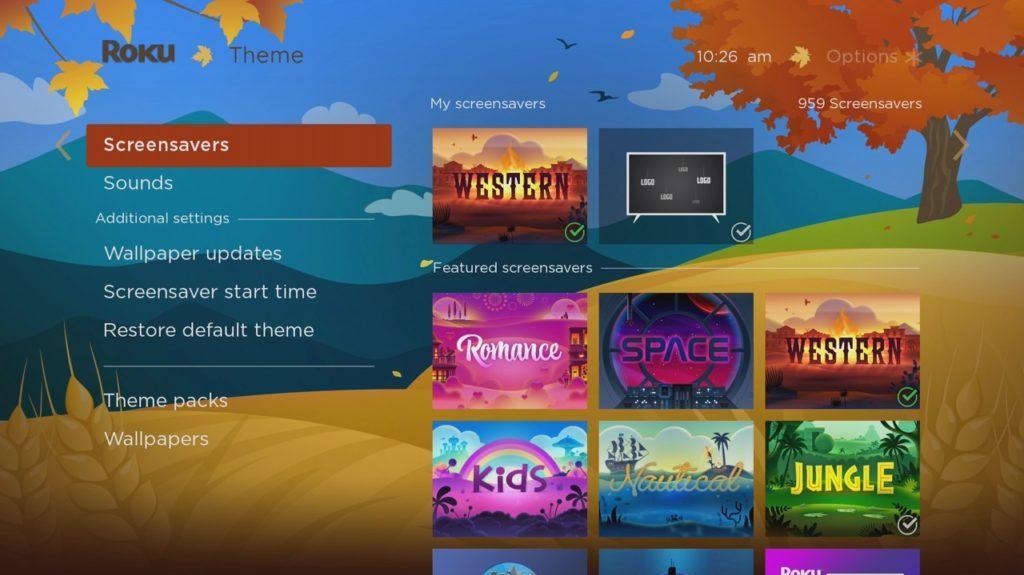
How to Change the Screensaver on Your Roku Device
If you want to replace Aquatic Life before its removal, follow these steps:
Press the Home button on your Roku remote.
Open Settings.
Select Theme.
Navigate to Screensavers.
Browse the available screensavers.
Select your preferred option.
Choose Set as screensaver or the equivalent installation option.
You can also adjust the screensaver waiting time to control how long your television remains idle before the screensaver starts.
The exact menu wording may vary depending on your Roku device and software version.
Can You Still Use the Original Aquatic Life Screensaver?
There is some good news for fans of the original aquarium.
The Aquatic Life animation is still available to watch as a YouTube video, while the creator's Marine Aquarium software is also available for platforms including Windows, Mac, and Android.
However, these alternatives do not guarantee that the original Roku screensaver will continue working after December 1.
Users interested in the original experience can also explore the creator's SereneScreen project for updates.

Leave a comment
Your email address will not be published. Required fields are marked *