

Xbox PC App Gets Major Speed Boost With Up to 60% Faster Launch Times
Microsoft is giving its Xbox PC app a significant performance and design upgrade, aiming to make gaming on Windows faster and easier. The redesigned application is now available to Xbox Insiders, with Microsoft reporting launch times up to 60% faster than the previous version.
The update also improves navigation, search, game library organization and social features. Microsoft is making changes beyond the desktop app too, with a refreshed Xbox web experience and updates for supported cloud gaming apps on TVs and VR headsets.
Xbox PC App Now Launches Up to 60% Faster
Performance is one of the biggest improvements in Microsoft's latest update.
According to the company, the redesigned Xbox PC app launches up to 60% faster. Microsoft has also improved loading times across several important sections:
- App launch: Up to 60% faster.
- Home, Store and Game Pass pages: Up to 50% faster loading.
- In-app windows: Up to 65% faster opening times.
These figures come from Microsoft's internal testing. Actual results may vary depending on the computer, internet connection, system configuration and usage.
The improvements should make everyday tasks, such as opening the game library, browsing Game Pass and switching between different sections, feel more responsive.
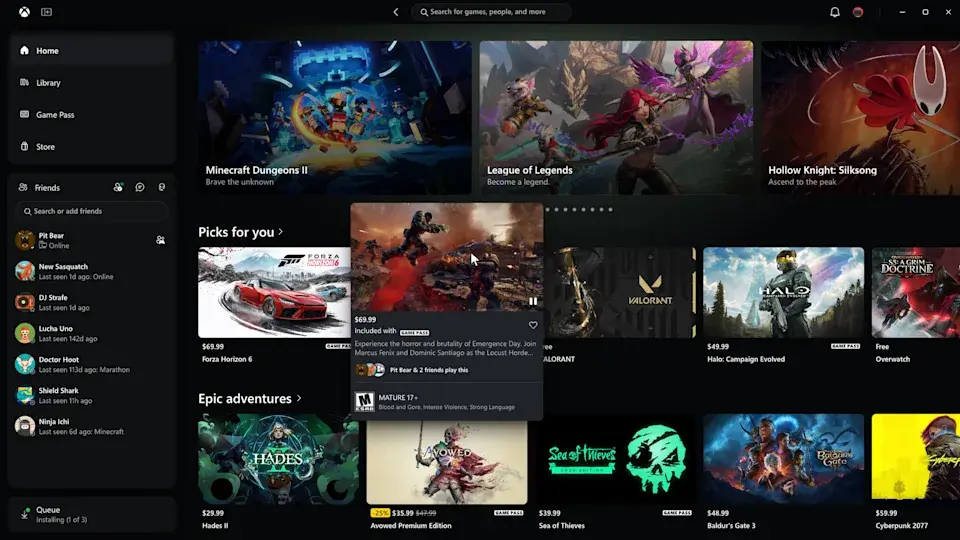
Microsoft Redesigns the Xbox Game Library
The updated application also introduces a simpler library experience.
Microsoft has improved navigation, added updated filters and introduced new ways to organize games. These changes should make it easier for PC players to find installed titles and browse their collections.
Search has also been improved. Players can search across games, installed titles, add-ons and people from a more unified interface.
The redesigned game cards, Home page, Settings section and animations give the application a refreshed appearance.
Friends and Social Features Are Easier to Access
Microsoft is also making it easier for players to connect with friends.
Previously, finding social features could require navigating through different sections of the application. In the redesigned version, friends and social features are included in the main navigation.
This makes it easier to see what friends are playing, start conversations and join parties without searching through multiple menus.
For players who regularly use Xbox for multiplayer gaming, this could be one of the more useful improvements.
Xbox Cloud Gaming Gets a Refreshed Web Experience
The redesign is not limited to Windows computers.
Microsoft is preparing to bring its refreshed Xbox web experience to more players over the coming weeks. The updated interface is designed to make browsing and launching cloud games easier.
One of the main additions is a new Library tab that brings together cloud games available through a player's own collection and Xbox Game Pass.
Users will be able to browse, sort and filter games using options such as recently played titles, genres and supported input methods.
The web experience also introduces a desktop mode that makes better use of larger displays, allowing PC users to see more games while browsing.
New Display and Accessibility Options
Microsoft is adding more customization options to the Xbox cloud gaming web interface.
Players will be able to choose between light and dark themes. The redesigned experience also includes five high-contrast options intended to support different visual needs and preferences.
These additions should make the interface more flexible and comfortable for a wider range of users.
Xbox Cloud Gaming Updates Are Coming to TVs and VR Headsets
Microsoft is also beginning to bring the refreshed design and navigation to Xbox cloud gaming applications on supported televisions and VR headsets.
The goal is to make Xbox feel more familiar across different devices while adapting the interface to each screen.
Although the overall experience will share common design elements, Microsoft says the interface will be adjusted depending on whether someone is playing on a PC, television or VR headset.
How to Try the New Xbox PC App
The redesigned Xbox PC app is currently available to members of the Xbox Insider Program.
Players who want to test it can follow these steps:
- Download Xbox Insider Hub from the Microsoft Store.
- Open the application on your Windows PC.
- Select Previews from the navigation panel.
- Find the PC Gaming preview.
- Select Join and wait for enrollment to complete.
- Check the Xbox app and Microsoft Store for the updated version.
The update is being distributed to Insiders, so it may not appear immediately for every participant.
Can the New Xbox App Compete With Steam?
Microsoft's improvements are an important step toward making Xbox more attractive to PC gamers.
Steam remains a major destination for PC gaming, offering a large game library, community features, mod support and an established desktop experience.
A faster Xbox app could improve Microsoft's position, especially for players who use Game Pass or own games that support Xbox Play Anywhere.
However, performance improvements alone may not persuade every PC gamer to switch launchers. The overall game catalogue, community tools, pricing and features will also influence that decision.
Final Thoughts
Microsoft's latest Xbox PC app update focuses on three important areas: speed, navigation and accessibility.
With launch times reportedly improving by up to 60%, faster page loading and a more organized library, the redesign could make the application considerably more convenient for Windows gamers.
The refreshed web and cloud gaming experiences also show that Microsoft wants a more consistent Xbox experience across PCs, televisions and VR headsets.
For now, the redesigned PC app is available through the Xbox Insider Program, while the wider web experience is scheduled to reach more players over the coming weeks.
Bir yorum bırakın
E-posta adresiniz yayınlanmayacaktır. Gerekli alanlar * ile işaretlenmiştir