


Benefits of UnlockTool: A Complete Guide for Mobile Phone Repair Technicians
Introduction
Mobile phone software repair has become an important part of the smartphone repair industry. From software errors and boot loops to firmware problems and device configuration issues, technicians need reliable tools to diagnose and service compatible smartphones efficiently. UnlockTool is a professional mobile phone servicing software designed to support a range of smartphone repair and maintenance operations.
UnlockTool provides different functions for supported Android devices and selected Apple devices. Depending on the phone model, chipset, firmware version, and software release, technicians may be able to perform factory resets, firmware flashing, device diagnostics, and other servicing procedures.
For mobile phone repair shops, using a suitable servicing tool can help improve workflow efficiency, expand available services, and reduce the time required for certain software-related repairs.
In this guide, we explore the major benefits of UnlockTool, its practical uses, its importance for mobile repair businesses, and the precautions technicians should consider before using it.
What Is UnlockTool?
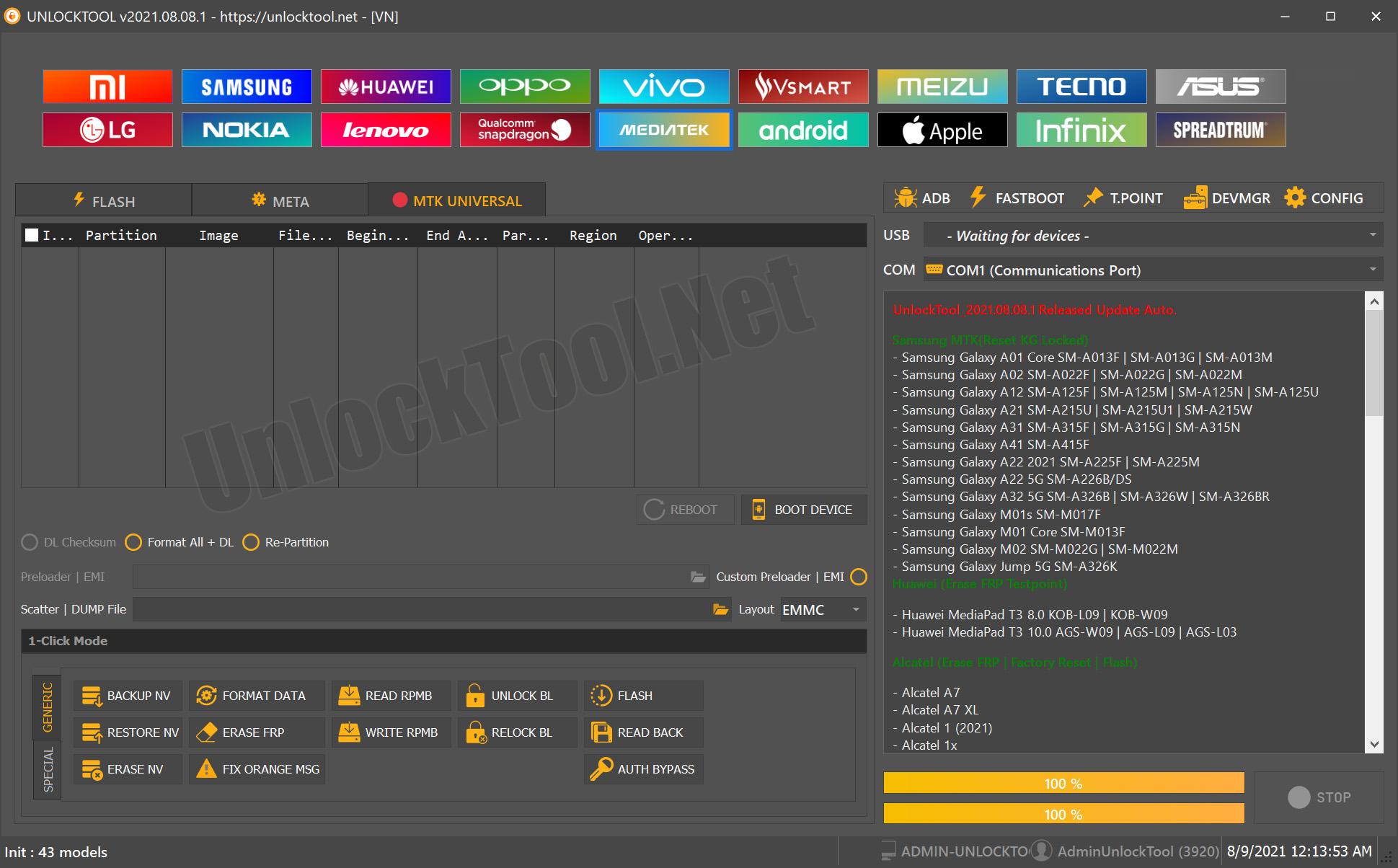
UnlockTool is a mobile phone servicing application used by technicians to perform supported software-level operations on compatible smartphones and tablets. It works with selected devices from several manufacturers and supports different hardware platforms, including MediaTek, Qualcomm Snapdragon, and Samsung Exynos.
The software is particularly useful for technicians who regularly handle smartphone software problems and need access to multiple servicing functions through one application.
Depending on the supported device, its available functions may include:
- Firmware flashing and software restoration.
- Factory reset and supported device-reset operations.
- Google Factory Reset Protection (FRP) servicing on eligible devices.
- Device information reading and diagnostics.
- Selected bootloader and partition-related operations.
- Backup and restoration of certain supported device data.
- Additional manufacturer-specific servicing functions.
Not every function is available for every smartphone. Technicians should always check the exact model number and the currently supported operation before starting a repair.
10 Major Benefits of UnlockTool
1. Multiple Mobile Repair Functions in One Tool
One of the main benefits of UnlockTool is that it brings multiple mobile servicing functions together in a single application.
Instead of maintaining separate software for every basic repair task, technicians may be able to use one compatible platform for several supported operations. These can include firmware-related work, factory resets, device information checks, and selected manufacturer-specific procedures.
This can make the repair process more organized, especially for technicians who handle smartphones from different brands.
Why it matters: A centralized servicing workflow can reduce unnecessary software switching and help technicians manage common repair tasks more efficiently.
2. Firmware Flashing and Software Repair
Smartphones can experience software problems after interrupted updates, corrupted firmware, unsuccessful modifications, or other system errors.
Depending on device compatibility, UnlockTool can help technicians perform firmware-related servicing and restore supported software configurations.
Firmware flashing may be useful when a phone experiences problems such as:
- Repeated restarting or a boot loop.
- Software corruption.
- An unsuccessful firmware update.
- Certain system-related startup failures.
- Software problems requiring an approved firmware restoration procedure.
Before flashing a device, technicians should confirm the exact model, hardware variant, firmware compatibility, and required software version.
Incorrect firmware or an interrupted flashing procedure can make a device unusable or cause additional problems. Backing up important data whenever possible is also essential.
3. Support for Google FRP Servicing
Factory Reset Protection, commonly known as FRP, is an Android security feature designed to help protect devices after a factory reset.
A phone may request the previously associated Google account during setup. This can become a problem for a legitimate owner who has forgotten their account details or purchased a second-hand phone without receiving the necessary account-removal assistance.
UnlockTool advertises FRP-related servicing functions for selected compatible devices.
For mobile repair shops, this can provide another service option when a customer can demonstrate ownership and the device is eligible for the required procedure.
Technicians must respect device ownership and security protections. Where possible, the owner should first recover the Google account through Google's official account-recovery process. FRP support should never be treated as universal, because compatibility depends on the device and its software security configuration.
4. Support for Multiple Smartphone Brands
Mobile repair shops frequently receive phones from different manufacturers. Using a servicing solution that covers multiple brands can help technicians manage a broader range of repair requests.
UnlockTool supports selected devices from manufacturers such as:
- Samsung
- Xiaomi, Redmi, and POCO
- OPPO
- Vivo
- Realme
- Huawei
- Infinix
- Tecno
- Motorola
- Other supported manufacturers
The exact number of supported models and functions can change with software updates.
A manufacturer's name appearing in a compatibility list does not mean that every phone from that brand is supported. Model numbers, regional variants, chipsets, firmware builds, and security patches can all affect compatibility.
5. MediaTek and Qualcomm Platform Support
Many Android smartphones use MediaTek or Qualcomm chipsets. Repair procedures can differ significantly between these platforms, even when two phones have similar specifications.
UnlockTool includes servicing workflows for selected devices based on MediaTek and Qualcomm hardware, alongside other supported platforms.
This can be valuable for technicians who repair different types of Android smartphones and need platform-specific software functions.
Before starting an operation, technicians should identify the phone's exact hardware platform and verify whether the required procedure is supported. Using an incorrect loader, incompatible firmware, or unsuitable service method can result in failed operations or device damage.
6. Faster Troubleshooting for Certain Software Problems
Time is important in a busy mobile phone repair shop. A technician may handle multiple devices every day, and lengthy troubleshooting can reduce the number of jobs completed.
A compatible servicing tool can make some software-repair tasks more straightforward by providing specific operations and device information in one place.
For example, a technician dealing with a supported phone that cannot start normally may be able to use an appropriate firmware or recovery procedure instead of relying exclusively on basic troubleshooting.
However, UnlockTool cannot automatically repair every smartphone problem. Hardware faults, damaged storage components, faulty batteries, water damage, and other physical defects may require different diagnostic equipment or component-level repair.
The real benefit is having another suitable option for software-related troubleshooting.
7. Device Information and Diagnostic Assistance
Accurate device identification is an important part of professional mobile repair.
Before performing a software operation, a technician may need to identify the device model, hardware platform, software version, or other available device information.
UnlockTool offers information-reading and diagnostic functions for selected supported devices.
These details can help technicians choose a more appropriate repair procedure and avoid mistakes caused by confusing similar phone models or hardware variants.
A good repair process should always begin with diagnosis rather than immediately performing a reset or flashing operation.
8. Support for Selected Samsung Servicing Operations
Samsung smartphones use different hardware platforms and software configurations across their product ranges. The available repair procedures can also depend on the model's security revision and firmware version.
UnlockTool supports selected Samsung devices and offers various servicing functions depending on the hardware and software configuration.
Supported operations may include certain firmware-related procedures, device resets, device-information functions, and eligible FRP-related services.
This can be helpful for shops that regularly repair Samsung Galaxy smartphones and tablets.
Before beginning a repair, technicians should verify the exact model code, chipset, bootloader or binary revision where applicable, and the specific operation supported by the current software version.
9. Regular Software Updates
Smartphone manufacturers continually release new devices, operating-system updates, security patches, and firmware revisions. These changes can affect existing repair procedures.
Regular servicing-tool updates are therefore important for professional technicians.
UnlockTool publishes software updates that can introduce additional device support, improve existing functions, and address certain compatibility or operational problems.
Keeping the application updated can help technicians access newly supported procedures and avoid attempting repairs with outdated files or methods.
However, an update does not guarantee support for every new phone. Technicians should read the release notes and confirm compatibility before relying on a newly advertised function.
10. Opportunities to Expand a Mobile Repair Business
UnlockTool can also be useful from a business perspective.
A mobile phone repair shop that already offers hardware repairs may be able to expand its services to include supported software-related work. Depending on the technician's training and available equipment, these services could include firmware restoration, software troubleshooting, eligible device-reset services, and supported diagnostic procedures.
Offering more repair options can help a shop serve a wider range of customer needs.
Before investing in a licence, a technician should compare the cost with the expected demand for supported repairs, the time saved, the cost of additional equipment, and the need for technical training.
The best investment is one that matches the actual repair work performed by the business.
How UnlockTool Can Help Mobile Phone Repair Shops
UnlockTool may be particularly useful for repair businesses that regularly receive smartphones with software-related problems.
Consider the following examples:
| Customer problem | Potential benefit |
|---|---|
| Phone stuck in a boot loop | Supported firmware restoration or software troubleshooting |
| Corrupted smartphone software | Compatible firmware flashing or recovery procedures |
| Forgotten account after a factory reset | Legitimate account recovery or eligible FRP servicing |
| Unclear device specifications | Available device-information and diagnostic functions |
| Software update failure | Diagnosis and compatible restoration procedures |
| Multiple brands arriving at the shop | One application for various supported servicing workflows |
These are examples of possible use cases, not guaranteed solutions. A technician should diagnose the device and verify compatibility before selecting a procedure.
Is UnlockTool Suitable for Beginners?
UnlockTool can be useful for beginners who want to learn mobile software repair, but having access to the software is not the same as having the skills to use it safely.
New technicians should first learn the basics of smartphone hardware, Android recovery modes, firmware compatibility, USB drivers, and device identification.
They should also understand the risks of factory resets, firmware flashing, and partition-related operations.
A sensible learning approach is to:
- Learn how to identify the exact phone model and chipset.
- Understand the difference between firmware restoration, factory reset, and account recovery.
- Check official documentation and current compatibility information.
- Practice with devices they own or are explicitly authorized to service.
- Back up customer data whenever possible before performing a destructive operation.
- Keep records of the repair procedure and any errors encountered.
Beginners should avoid experimenting with critical device operations on customer phones until they understand the risks and have sufficient practical experience.
Important Things to Check Before Using UnlockTool
Although servicing tools can be helpful, technicians should consider several important factors before using them.
Device compatibility: Verify the exact model and required function rather than relying only on the phone's brand.
Software version: Android versions, security patches, and firmware revisions can affect the available procedures.
Data loss: Factory resets and some servicing operations can erase user data. Explain the risks to customers before proceeding.
Device ownership: Only service devices that the customer owns or is authorized to have repaired. Respect account security and anti-theft protections.
Official software source: Obtain the software through the official website and exercise caution with modified installers or unknown third-party downloads.
Licence requirements: Check the current licence conditions, supported operations, and account requirements before purchasing access.
Repair limitations: Software tools cannot resolve every hardware failure, and an unsuccessful operation may require additional diagnosis.
Following these precautions can help technicians reduce unnecessary risks and maintain a more professional repair service.
Frequently Asked Questions About UnlockTool
What is UnlockTool used for?
UnlockTool is a mobile device servicing application used for supported software repair, firmware-related operations, device resets, diagnostics, and other model-specific functions.
Is UnlockTool useful for mobile repair technicians?
Yes. It may be useful for technicians who regularly work on compatible smartphones and need software servicing functions across supported devices and hardware platforms.
Does UnlockTool support all Android phones?
No. Compatibility varies by brand, model, chipset, firmware version, security patch, and the operation being performed.
Can UnlockTool repair a phone that is stuck on the logo?
It may help if the underlying problem is related to software and a compatible restoration procedure is available. Hardware faults and storage failures require separate diagnosis.
Does UnlockTool support Samsung phones?
It supports selected Samsung smartphones and tablets. The available functions depend on the exact device and software configuration.
Can UnlockTool be used for MediaTek and Qualcomm phones?
Yes, it offers servicing workflows for selected MediaTek and Qualcomm devices. Not every chipset or model supports every operation.
Is UnlockTool free?
Do not assume that downloading the setup provides full access. Check the official website for current account, licence, and activation requirements.
Does UnlockTool work on every new phone after an update?
No. New releases can add support or improve existing functions, but individual devices and security versions still need to be checked.
Final Verdict: Is UnlockTool Worth Considering?
UnlockTool is worth considering for mobile phone repair technicians who regularly perform supported smartphone software repairs. Its main advantages include a range of servicing functions, support for selected devices from multiple manufacturers, platform-specific workflows, diagnostic assistance, and ongoing software updates.
For repair shops, these capabilities may help improve workflow efficiency and expand the range of software-related services they can offer.
However, successful repairs depend on more than the software alone. Technicians need the correct device information, compatible firmware, appropriate drivers, practical knowledge, and a clear understanding of data-loss and device-security risks.
Before purchasing a licence, check the current supported-device list and confirm that the functions you actually need are available.
For further information, visit the official UnlockTool website.
Leave a comment
Your email address will not be published. Required fields are marked *