


Xbox Rebuilt PC App Tested on Xbox Ally: Faster Loading and Smoother Navigation
Microsoft is preparing a major overhaul of its Xbox PC app, and early testing suggests the redesigned software could significantly improve the experience for PC gamers and handheld devices such as the Xbox Ally.
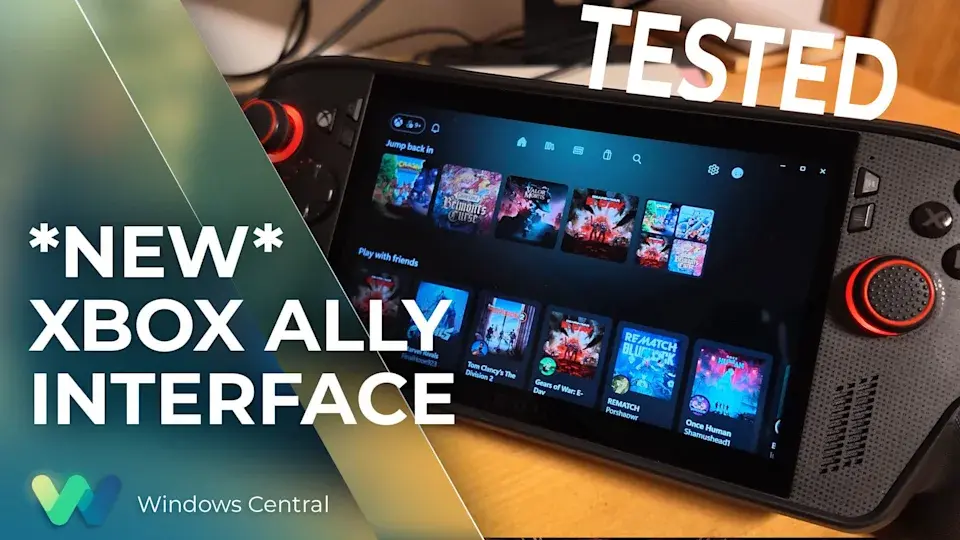
An early version of the rebuilt Xbox PC app was tested on an Xbox Ally, showing noticeable improvements in loading times, responsiveness and navigation compared with the current application.
The redesigned app is still an unfinished preview, so some features and visual elements could change before Microsoft releases the final version.
Major Performance Improvements
The biggest improvement in the new Xbox PC app appears to be performance.
The current app can sometimes feel slow when navigating large game libraries, with delays and occasional input problems. On the Xbox Ally, the early version of the redesigned app reportedly eliminates much of this sluggish behavior.
Navigation through large collections of games feels considerably smoother, while different sections of the app load more quickly.
This is particularly important for handheld gaming PCs, where players often expect a console-like experience rather than a traditional desktop interface.
Smoother Controller Navigation
The rebuilt Xbox PC app also appears to be better optimized for controller-based navigation.
The earlier app could sometimes behave awkwardly when navigating with a controller, including unexpected cursor movement and delayed responses. The new version is designed to make navigation feel more natural with a gamepad.
For devices such as the Xbox Ally, this could be one of the most important improvements because users are likely to interact with the Xbox interface primarily through physical controls rather than a mouse and keyboard.
Faster Game Library Loading
Large game libraries have been another weakness of the existing Xbox PC application.
An earlier hands-on test reported that the redesigned application could load a library containing more than 1,400 Xbox games much faster than the previous version. The new design also makes it easier to distinguish games that can be installed from those that are available through Xbox Cloud Gaming.
For users with extensive Game Pass or Xbox libraries, these changes could make finding and launching games much less frustrating.
Store and Game Pages Are More Streamlined
Microsoft is also simplifying the way game information is presented.
The redesigned interface brings store and game listings closer together instead of forcing users to move between separate pages. This creates a more consistent browsing experience when searching for games or exploring the Xbox catalog.
The goal appears to be making the Xbox PC app feel less like a traditional Windows application and more like a gaming-focused interface.
Designed for Both PCs and Handhelds
The new Xbox PC app isn't only intended for conventional desktop computers.
The interface supports both mouse-and-keyboard controls and gamepad navigation, making it suitable for a wider range of Windows gaming devices.
The app can also work as a default home screen for Windows 11's gaming-focused experience, which could make it especially useful on handheld gaming PCs such as the Xbox Ally.
Don't Expect a Huge Feature List Yet
Despite the performance improvements, the early version doesn't appear to introduce a large number of completely new features.
Instead, Microsoft seems to be concentrating first on making the existing Xbox PC experience faster and easier to use.
The early build is still under development, and Microsoft is expected to make additional changes before the application becomes widely available.
Xbox PC App Could Get Even Better
The redesigned application comes as Microsoft continues to put greater emphasis on PC gaming.
Xbox has increasingly expanded beyond traditional consoles through PC gaming, Game Pass, Xbox Play Anywhere and cloud gaming. Improving the PC application could help bring these services together under a more unified interface.
However, there are still areas Microsoft could improve, including search, community features, developer interaction, customization and mod support.
When Will the New Xbox PC App Be Available?
Microsoft has not announced a final public release date for the rebuilt Xbox PC app.
The early version is expected to reach Xbox Insiders on PC, potentially before the end of 2026, while additional development and testing continue.
Because the current version is still a preview, the final application could look or perform differently when Microsoft officially releases it.
Final Thoughts
The early testing of Microsoft's rebuilt Xbox PC app is encouraging.
The biggest improvements aren't necessarily flashy new features. Instead, Microsoft appears to be focusing on the fundamentals that matter most: faster loading, responsive navigation and better controller support.
For Xbox Ally and other Windows gaming handheld users, these changes could make the Xbox PC experience feel much closer to using a dedicated gaming console.
If Microsoft continues improving the app before its wider release, the redesigned Xbox PC experience could become an important part of the company's broader PC gaming strategy.
Leave a comment
Your email address will not be published. Required fields are marked *